


ExploreHere - Roadtrip Guide
3.758.00 Reviews
App Specs
- Version
- 4.17.0
- Updated On
- License
- Free
- Downloads
- 10,000+
- Developer
- ExploreHere Apps
- Categories
- Travel & Local
- Platform
- Android
Screenshots


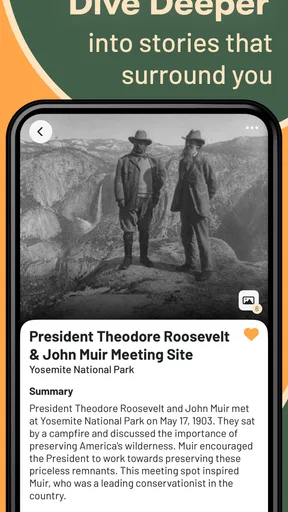

 Analysis by AppCompare
On a road trip, I’m often more interested in what lies between two destinations than in shaving a few minutes off the drive. That is the niche ExploreHere - Roadtrip Guide aims to fill: helping travelers notice landmarks and historic places, with audio stories intended for listening while driving. It makes most sense as a companion for a scenic journey, not as a replacement for every tool you already use to get around.
Where setup and expectations can get tricky
The first decision is what you want from a travel app. If you need the fastest route, live traffic guidance, or a dependable turn-by-turn navigator, a conventional maps app is still the more natural starting point. ExploreHere is better suited to adding points of interest and context to a drive. I’d plan the route with my usual navigation tool, then use this app to help decide whether a detour or an extra stop sounds worthwhile.
That distinction matters because discovery tools can feel disappointing when they’re treated like complete trip planners. A landmark suggestion is only useful if it fits your route, timing, and appetite for stops. Before setting off, I’d look over the places that interest me and choose a realistic handful, rather than expecting an app to make every decision along the way.
There is also a difference between seeing a place on a screen and being able to visit it. A historic site may be close to the road but still require time for parking, walking, or checking local access. I treat suggestions as prompts to investigate, not guarantees that a stop will be convenient. That small shift in expectations makes a discovery-focused guide more useful and reduces the temptation to rush.
A low-stress way to prepare a drive
For a weekend outing, I’d start with the broad journey and then use ExploreHere to consider possible breaks: perhaps a landmark that gives the drive a sense of place, or a historic stop that turns a routine transfer into part of the trip. The best plan leaves breathing room. If every minute is booked, even a good recommendation can become another obligation.
A practical habit is to review possible stops before leaving, while you can compare them calmly with your schedule. Decide which ones are priorities and which are optional. If the day runs late, you can skip the optional choices without feeling that the app has derailed the plan. This is especially helpful for families, groups with different interests, or anyone driving a long distance with limited daylight.
Audio stories can make a drive feel less like dead time, but they call for sensible use. I would set up anything I need to read or choose while parked, then let the driver focus on the road. Passengers can help with decisions and keep an eye on changing plans. A hands-free approach is valuable only when it actually reduces distraction; no attraction is worth dividing a driver’s attention.
Worth Reading Before You Choose

Flipboard Shows What News Apps Must Do Beyond the Feed

Switching to Android Auto Means Rethinking Your Driving Routine

Google Calendar Makes a Crowded Week Easier to Manage

Ludo King Makes the Most of the Minutes Between Plans

Baby Panda World Brings Quick Play to Modern Phones, but Its Game Library Feels Busy

ESPN’s Live Game View Makes Following Close Games Easier
Who will get the most from it
I can see this app appealing to curious travelers who enjoy local history, roadside landmarks, and the freedom to add a stop when something catches their interest. It may also suit people who plan loosely: they know the general direction of the trip but want ideas for making the journey itself more memorable. ExploreHere is less compelling for a tightly scheduled commute, a point-to-point drive where speed is the only priority, or a traveler who wants a full itinerary managed in one place.
Compared with general-purpose maps, the emphasis here is discovery and storytelling rather than simply finding a route. Compared with travel blogs or lists saved in a browser, an app centered on roadside exploration can be easier to consult during trip preparation. Those alternatives still have an edge when you want detailed local reporting, current practical advice, or a broad collection of opinions. I’d use ExploreHere alongside them rather than assume one source answers every question.
For a realistic example, imagine driving to visit relatives and having a free hour before you need to arrive. I’d check for a nearby landmark or historic stop before departure, choose one that doesn’t threaten the arrival time, and keep another idea as a backup. If the weather or traffic changes the plan, I’d drop the detour rather than trying to force it. The app can help make that spare hour more interesting, but the schedule and conditions should make the final call.
Getting Started with ExploreHere
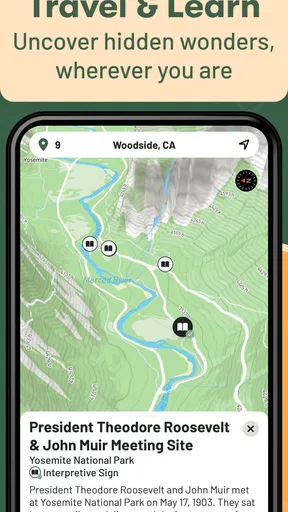
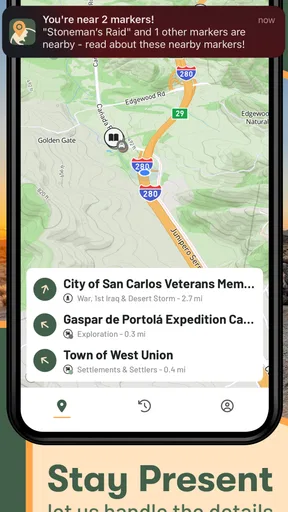
The first thing you'll notice when you open ExploreHere - Roadtrip Guide is how user-friendly it is. The interface is sleek and intuitive, which means you don't have to be a tech wizard to navigate it. I was able to dive right in without feeling overwhelmed. The home screen gives you a quick overview of nearby attractions, making it easy to plan your next stop.
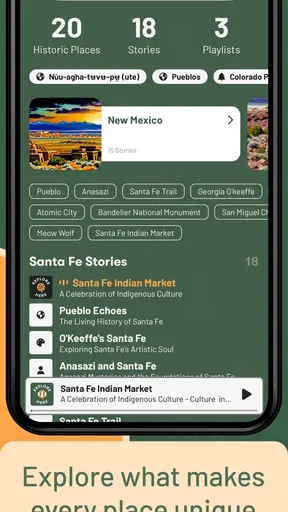
The app offers a comprehensive database of points of interest, from popular tourist spots to hidden gems. It's like having a personal tour guide in your pocket. Just type in your current location or your destination, and bam! A list of attractions, complete with ratings and reviews, appears.
Features to Fuel Your Wanderlust
One of my favorite features is the "Trip Planner." It's an absolute game-changer for anyone who loves road trips but hates the planning part. You can customize your route, add multiple stops, and even find recommendations for accommodations and dining along the way. It's like having a roadmap that evolves as you travel.
Another cool feature is the "Offline Mode." We've all been there—lost in the middle of nowhere with zero cell service. With ExploreHere, you can download maps and guides ahead of time. This was a lifesaver for me during my last trip through some remote mountain areas.
Personal Experience on the Road
I recently took a trip to the Pacific Northwest, and ExploreHere was my co-pilot. From the breathtaking views at Crater Lake to the quirky roadside attractions in Portland, the app had me covered. I discovered a quaint little coffee shop that I would have never found without it.
One thing I noticed is how well the app integrates user reviews. It's always nice to see what fellow travelers have to say before making a stop. The reviews are generally spot-on and helped me avoid a few tourist traps.
Room for Improvement?
While I absolutely love the app, there are a couple of areas that could use some tweaking. The search feature, for instance, can be a bit finicky. Sometimes I had to be pretty specific with my queries to get the results I was looking for. Also, while the app covers a lot of ground, there were a few lesser-known spots that didn't show up in the search results.
Another minor gripe is that some of the user-generated content can be a bit outdated. It's always a good idea to double-check opening hours or admission fees before heading out, just to be safe.
Checking details and judging value
When a search seems unhelpful, I’d first try a simpler place name or search around the destination rather than relying on a very narrow phrase. If a promising stop does not appear, I would widen the search and use another source to check local options. That is a useful workaround, but it also shows a real trade-off: a curated discovery app can surface ideas quickly, yet it should not be your only research method when a specific small-town venue matters.
Before committing to a stop, I’d verify practical details directly, especially opening hours, access, and any admission cost. Reviews can reveal whether visitors found a place worthwhile, but they are opinions and may age. I also separate “interesting” from “currently convenient”: a site might be worth remembering for another trip even if it cannot fit today’s route.
ExploreHere is free to download, with in-app purchases ranging from $3.99 to $149.99 per item. I’d explore the basic experience before paying for anything, then decide whether a purchase addresses a real need in my travel routine. The app is rated for Everyone, and its average rating is 3.7 from 61 ratings, with 24 written reviews. Those figures suggest a modest, mixed response rather than a clear consensus, so I’d weigh them alongside whether its focus matches the way I travel.
What to check when something goes wrong
If a page or search does not behave as expected, I’d begin with simple checks: confirm the place name and location, make sure the app is current, and try again when the phone has a reliable connection. ExploreHere is version 4.10.2 and supports Android 7.0 or later. If the problem happens only in one area, it may be more useful to test another nearby search than to assume the whole app is unusable.
For a drive where connectivity may be uncertain, prepare before leaving and check that any material you expect to use is available in the way you planned. The original experience includes an offline mode for downloaded maps and guides, but I would not wait until a signal disappears to work out what is ready. A quick pre-trip check, while parked and connected, is a simple way to avoid relying on last-minute troubleshooting at the roadside.
If an attraction seems missing or its details look stale, I’d treat that as a content limitation rather than a navigation failure. Search with a broader term, consult a second source, and contact the place directly when the visit depends on a specific detail. If nothing changes after basic checks, switching to a familiar map or local tourism resource is sensible. The goal is a good trip, not proving that one app can do everything.
Who should keep it in their travel kit
ExploreHere is developed by ExploreHere Apps and belongs in the travel-and-local discovery space. It has over 10K installs, which gives it a foothold among road-trip tools without making it the obvious choice for every traveler. I’d recommend giving it a try if you enjoy learning about places along a route and are comfortable confirming important details elsewhere. I’d skip it if you mainly need precise navigation, exhaustive coverage of obscure stops, or a single app that handles every travel task.
My practical verdict is that this guide is most useful when it adds curiosity to a journey you have already planned. Its landmarks and audio-story angle can give a familiar drive more character, while the search and freshness limitations mean I would keep a backup source close. Used with realistic expectations—and with the driver’s attention kept on the road—it can help turn an ordinary stretch of travel into a reason to pause and look around.
Wrapping It Up
In a nutshell, ExploreHere - Roadtrip Guide is a fantastic tool for anyone looking to explore the open road. It's packed with features that make planning and navigating a breeze. Sure, it has a couple of quirks, but what app doesn't?
So, if you're itching for adventure and want a reliable travel companion, give ExploreHere a try. Who knows, it might lead you to your next favorite spot. Happy travels!
Pros
- User-friendly interface for easy navigation.
- Extensive offline maps for remote areas.
- Personalized trip recommendations.
- Real-time traffic updates.
- Integrated weather forecasts.
Cons
- Consumes significant battery life.
- Limited free features available.
- Occasional map loading delays.
- Requires constant updates for accuracy.
- Some features need internet connection.
FAQs for ExploreHere - Roadtrip Guide
What is ExploreHere - Roadtrip Guide, and how does it enhance my travel experience?
ExploreHere is a comprehensive road trip guide app designed to enhance your travel experience by providing detailed itineraries, must-see attractions, and hidden gems along your route. It offers curated recommendations based on your interests, ensuring you don't miss out on local culture, dining, and outdoor activities. It’s like having a personal tour guide in your pocket.
Does ExploreHere work offline, and how does it manage data usage?
Yes, ExploreHere offers offline capabilities so you can access maps and essential trip information without an internet connection. This feature is particularly useful in remote areas with limited connectivity. You can download the necessary data before your trip, which helps manage your data usage efficiently while on the road.
How customizable are the itineraries in ExploreHere?
The app offers highly customizable itineraries that can be adjusted based on your preferences and time constraints. You can add or remove stops, choose specific points of interest, and even set travel time estimates. This flexibility ensures that your trip remains tailored to your unique travel style and interests.
What are the safety features provided by ExploreHere?
ExploreHere includes several safety features, such as real-time traffic updates, weather alerts, and information on road conditions. These features help you plan your route more effectively and avoid potential hazards. Additionally, the app can provide emergency contact information and guide you to nearby help if needed.
Is ExploreHere compatible with both Android and iOS devices?
Yes, ExploreHere is designed to be compatible with both Android and iOS platforms. The app is optimized for a seamless experience on a wide range of devices, ensuring that all users can enjoy its comprehensive features and intuitive interface, regardless of their chosen operating system.


